
Billplz with Odoo: Secure Payments with XSignature, Callback & Redirect

If you are using Odoo in Malaysia, Billplz is a natural choice for accepting online payments. With a dedicated integration, Billplz works like any other Odoo payment provider, while adding strong security through XSignature and a robust callback/redirect flow.
Why Billplz Fits Naturally into Odoo
Billplz provides FPX, cards, and other local payment methods via a clean REST API.On the Odoo side, it plugs into the standard payment acquirer framework:
Customers choose “Billplz” at checkout or from an invoice.
Odoo creates a Billplz bill via the v3/bills API.
The customer is redirected to the Billplz payment page to pay.
After payment, Odoo is updated automatically and your invoice or order is marked as paid.
From a user’s perspective, it feels like any other Odoo online payment flow, but optimized for the Malaysian banking ecosystem.


The Core Flow: Bill Creation and Sync
Behind the scenes, the integration handles several steps for you:
Fetch setup dataOdoo can sync FPX banks and active payment methods from Billplz so your checkout page shows only valid, enabled options.
Create a bill automaticallyWhen a customer confirms payment:
Odoo prepares the bill payload (amount, customer email/phone, references).
It calls Billplz’s v3/bills endpoint.
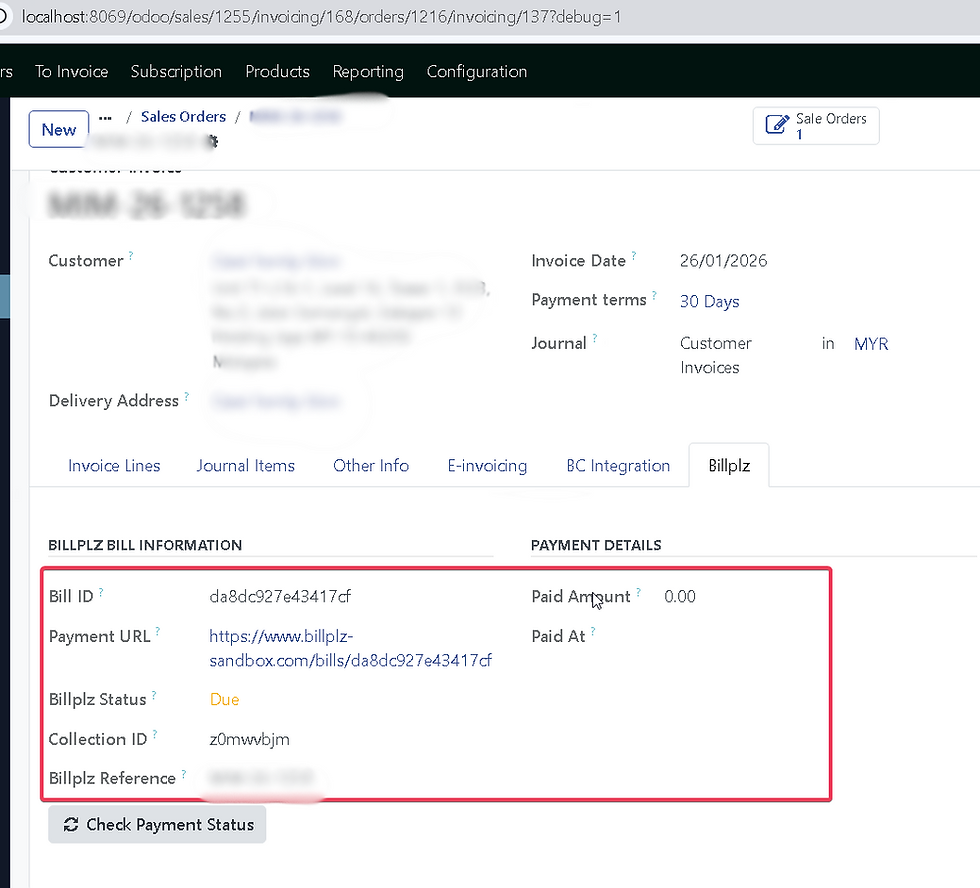
It stores the returned Bill ID and Bill URL on the transaction or invoice.
The customer is then redirected to the Billplz hosted payment page.
Check the final statusTo know if a payment is truly successful, Odoo queries Billplz:
GET /v3/bills/{bill_id} for the latest status.
Optional transaction logs for more detailed audit info.
The key idea: Billplz is the source of truth


XSignature: The Security Layer
Whenever Billplz sends a server‑to‑server notification (callback) to Odoo, it includes an x_signature value. This signature proves the payload came from Billplz and wasn’t modified in transit.
The verification process works like this:
Odoo receives the callback payload (for example: bill ID, paid flag, amounts, etc.).
It removes the x_signature field from the data.
It sorts the remaining keys (case‑insensitive) and concatenates them into a single string, in the format keyvaluekeyvalue....
Using the XSignature Key configured on the payment provider, Odoo computes an HMAC‑SHA256 hash of that string.
It compares the computed hash with the x_signature received from Billplz.
If the signatures do not match, the callback is rejected and the transaction is not marked as paid.
This protects you against:
Fake POSTs trying to mark invoices as paid.
Tampered payloads where the amount or status has been altered.
Replay attempts with old or manipulated data.
Only when the signature is valid does Odoo proceed to sync and process the payment.

Callback: Reliable, Server‑to‑Server Updates
Callbacks are server‑to‑server notifications that Billplz sends to Odoo when the status of a bill changes (e.g., from “pending” to “paid”).
Typical callback flow:
Billplz sends a POST to Odoo’s Billplz callback endpoint.
Odoo logs the payload and source IP for monitoring and rate‑limiting.
Odoo validates x_signature using the XSignature Key.
Odoo locates the matching payment transaction or invoice using:
Bill ID
Reference fields placed in the bill at creation time
Instead of blindly trusting the callback status, Odoo:
Calls back to Billplz’s API (e.g., GET /v3/bills/{bill_id}).
Uses that authoritative response to decide whether to mark the invoice/transaction as paid.
Odoo records payment, reconciles it, and updates any related business workflow.
So the callback acts as a trigger for synchronization, not as the single source of truth. The combination of XSignature verification and API re‑check gives you a very robust payment confirmation pipeline.
Redirect: Completing User Interaction Flow
While callbacks are about backend accuracy, redirects are about user experience.
After paying on Billplz, the customer’s browser is redirected back to Odoo via a redirect URL, carrying parameters such as:
Billplz bill ID
A flag indicating whether payment was successful
Additional contextual data
On Odoo’s side, the redirect handler:
Parses the parameters into a clean dictionary.
Maps the Bill ID back to the correct invoice or transaction.
Optionally performs another status sync with Billplz’s API, just like in the callback flow.
Decides where to send the user next:
Successful new registration → a “payment success / thank you” page.
Failed or cancelled payment → a payment retry or help page.
Existing customer invoice → back to the “My Invoices” page in the portal.
This means even if the callback is delayed or the user closes the window and reopens later, the redirect handler can still show them the correct final state based on Billplz’s latest status.
Conclusion
For merchants and implementers, this integration offers:
Local payment comfortFPX and other local payment methods that Malaysian customers trust.
Security by designXSignature (HMAC‑SHA256) validation and IP logging, plus a “trust-but-verify” approach using Billplz’s own API.
AutomationAutomatic bill creation, status sync and invoice reconciliation, freeing your team from manual checks.
Clean user experienceClear success and failure paths for both new registrations and existing customers, with redirects that guide users to the right page at the right time.
If you’re running Odoo in Malaysia and still handling payments manually, connecting Odoo with Billplz is a practical way to secure and automate your cash collection without changing how your users interact with the system.


Comments