
Automating Retained Earnings in Odoo: A Smarter Way to Close Your Fiscal Year

Closing the fiscal year is one of the most critical and often stressful tasks in accounting. One small mistake in transferring profits to retained earnings can lead to inaccurate financial statements and audit complications. What if this process could run automatically, accurately, and on time without manual intervention?
In this article, we introduce a custom automation in Odoo that generates retained earnings journal entries automatically on the fiscal year closing date.
The Problem with Manual Year-End Closing
Traditionally, accountants need to:
Calculate net profit or loss
Pass a manual journal entry
Transfer balances to retained earnings
Ensure accuracy and compliance
This process is:
Time-consuming
Error-prone
Dependent on human timing
Missing or delaying this step can impact financial reporting and decision-making.
The Solution: Automated Retained Earnings Entry in Odoo
We’ve implemented a Scheduled Action (Cron Job) in Odoo that:
Automatically triggers on the fiscal year closing date
Calculates the net profit/loss
Generates the retained earnings journal entry
Ensures books are properly closed without manual effort
Simplified flow:
The system checks the company’s fiscal year closing date
On that date, the scheduled action is triggered
It calculates the net income from Profit & Loss accounts
A journal entry is created:
Profit is transferred to Retained Earnings
All income/expense balances are reset
The entry is posted automatically.
Next day, if there is any changes to the Net Profit/loss, the retained earning Journal entries will be unposted and re-posted.
The cycle will continue until the Accounting date is locked and no changes was allowed.
Benefits of This Automation
Accuracy
Eliminates human errors in calculations and postings
Time Saving
No need for manual intervention during year-end
Consistency
Ensures the process happens every year without fail
Better Financial Control
Gives real-time confidence in your financial statements
Ideal For
Companies with multiple fiscal periods
Finance teams looking to automate repetitive tasks
Screenshots
1. Scheduled Action Setup
Odoo → Settings → Technical → Scheduled Actions

2. Fiscal Year Configuration
Odoo → Settings → Uses & Companies → Companies

3. Generated Journal Entry
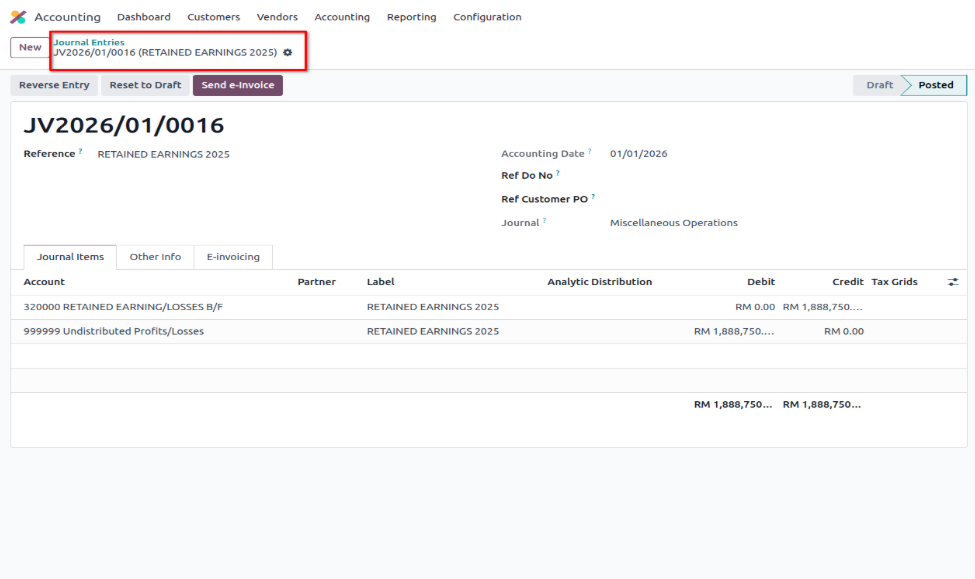
4. Journal Entry in Posted State (Multi Companies)


Comments