
GoExcel Logistics 5.0: From Web Inquiry to Booked Job in Minutes (Steps 1 to 5) - Part 2

Updated: Sep 21
Part 2 of our 3-Part Series on Streamlining Logistics with GoExcel Freight Portal for Odoo. The Modern Quoting & Conversion Flow with GoExcel Freight Portal for Odoo
The Chaos of Traditional Freight Quoting vs. The Modern Flow
In traditional freight forwarding, winning a customer’s business is often an uphill battle against friction:
Prospects send unstructured inquiry emails or fill out basic contact forms.
Customer Service (CS) spends hours re-typing cargo specifications, hunting down tariff sheets, and manually calculating container volumes and profit margins.
Quotations are drafted in static spreadsheets, saved as attachments, and sent back into the email void.
Customers reply with fragmented feedback across multiple email threads, causing delays and miscommunication.
The GoExcel Freight Portal transforms this scattered process into a fast, transparent, and collaborative digital flow.
In this post, we showcase the first half of that journey—Steps 1 to 5—demonstrating how an initial prospect inquiry on your website turns into a signed quotation and a live operational booking job in just a few seamless clicks.
The Quoting & Conversion Flow in Action
Step 1: Prospect Submits RFQ in the Portal
A Frictionless, Self-Service Inquiry Experience
The flow kicks off right on your public website via the interactive freight inquiry portal (/rfq_webform). Instead of a blunt "Contact Us" text box, shippers are greeted by an intuitive, logistics-aware quoting wizard designed to capture everything your CS team needs on day one.
Intelligent Mode Selection: Shippers quickly toggle between Ocean (FCL/LCL), Air, and Land freight across Export and Import routes.
Dynamic FCL Container Builder: Rather than typing freeform text, clients dynamically add container rows (20GP, 40GP, 40HC, Reefer), specifying quantities and estimated cargo weights on the fly.
Instant Volumetric Calculator (LCL & Air): Shippers enter package dimensions (Length × Width × Height) and pieces; the portal automatically calculates the exact CBM and volumetric weight.
Comprehensive Logistics Parameters: Built-in dropdowns capture essential trade details upfront: Incoterms (FOB, CIF, EXW, DDP), Type of Movement (Door-to-Door, Port-to-Port), HS Codes, and exact pickup/delivery addresses with dynamic state/country cascading.
Value-Added Trade Services: Shippers can check off optional services with one tap—Marine Cargo Insurance, Certificate of Origin (COO), Fumigation, or Trade Preference Forms (Form D/E).
Automated CRM & CS Alerts: The moment the shipper clicks Submit, Odoo automatically registers the new contact as a qualified prospect, generates a Draft Quotation, and pings your CS team with an instant notification.

Figure 1: Customer-facing Web RFQ form with dynamic container specification, trade services, and routing fields.
Step 2: CS User Receives RFQ & Updates Selling Price
Zero Re-Typing, Instant Rating & Real-Time Margin Control
Instead of copying and pasting details from an email into a spreadsheet, your CS team opens Odoo to find a fully structured Sales Quotation waiting for them. Every container specification, port pair, and special requirement submitted by the prospect is already mapped to the record.
Instant Context: Origin (POL), Destination (POD), vessel schedule preferences, and commodity details are immediately visible.
Tariff & Local Charge Integration: CS pulls ocean freight tariffs from contracted carriers and appends standardized local handling charges (THC, Seal Fees, Documentation, EDI) in seconds.
Multi-Currency Flexibility: Rates in USD, EUR, or RMB automatically convert to local billing currency using real-time system exchange rates.
Live Profit Margin Safeguards: As CS adjusts selling prices, Odoo computes the estimated cost, revenue, and expected profit margin live on screen, ensuring no quote goes out at a loss.

Figure 2: Odoo Sales Quotation backend form showing freight routing parameters.
Step 3: Marked as Sent & Quotation PDF Emailed to Prospect
Professional Presentation Delivered in Seconds
With selling prices and terms locked in, dispatching the quotation takes literally one click. There’s no need to format a Word document or save manual PDFs.
1-Click Dispatch: Clicking "Send SQ" activates Odoo’s integrated email composer, pre-filled with a professional quotation template tailored for logistics.
Executive Branded PDF: Odoo automatically generates an elegant, itemized PDF quotation complete with sailing schedules, charge breakdowns, cargo particulars, and legal terms.
Instant Portal Activation: Dispatching the email marks the quote status as Sent and immediately publishes the interactive version to the customer’s secure web portal dashboard.
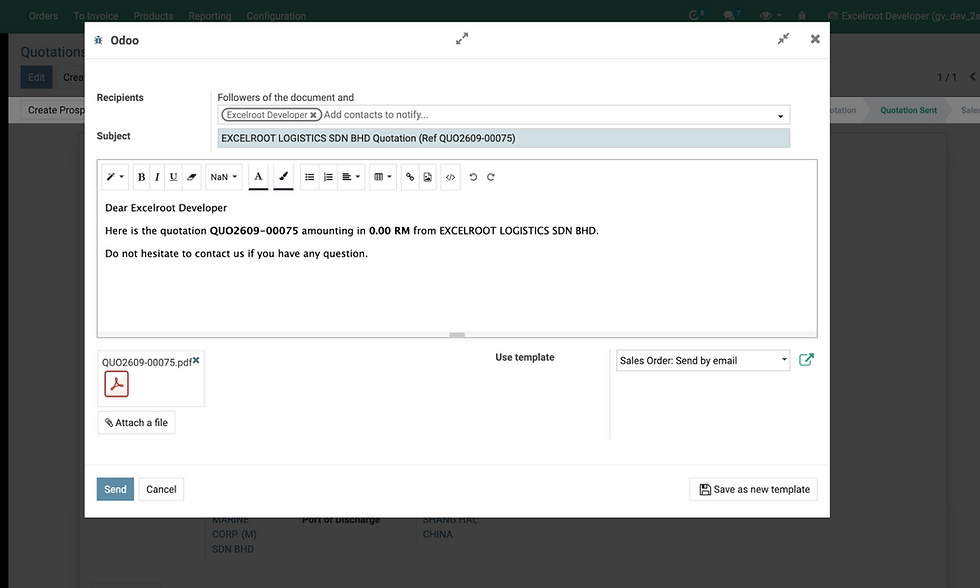
Figure 3: Odoo email composer wizard with automated PDF generation and template dispatch.
Step 4: Prospect Logs into Portal, Views Quotation, Accepts & Leaves Comments
Transparent Collaboration Without the Email Ping-Pong
Gone are the days when clients print, sign, scan, and email quotes back. The prospect clicks the link in their email and is taken directly into their secure customer portal (/my/quotes).
In-Browser Document Inspection: Clients inspect the complete charge breakdown, routing terms, and validity dates directly on their screen, with option to download or print the PDF.
Interactive Discussion Thread (Chatter): Have specific instructions or questions about cargo readiness? Shippers type notes directly into the portal discussion box, instantly notifying the CS team without losing context in personal inboxes.
Instant Digital Acceptance: When ready, the client clicks "Accept & Sign" (or "Approve"). The quotation status immediately updates to Accepted in both the portal and back-office.

Figure 4: Secure Customer Portal quotation view featuring in-browser PDF preview and interactive messaging chatter.
Step 5: CS User Creates Job & Copies Quotation Pricing and Shipment Info
Zero-Friction Handover from Commercial to Operational Reality
This is where the power of an integrated platform truly shines. In traditional setups, converting a won quote into an operational job means re-typing every single line into a separate operational freight system. With GoExcel, that handover happens in a split second.
1-Click Job Conversion: CS simply clicks "Create Job" on the accepted quotation.
Flawless Data Inheritance: Odoo instantly creates a full Freight Booking Job (freight.booking), carrying over:
Shipper, Consignee, and Notify party details.
Port pairs (POL, POD, Place of Delivery) and movement types.
Full container line matrices and cargo descriptions.
All quotation revenue lines, cost lines, and negotiated pricing—preserving your projected profit margins.
Audit-Proof Traceability: The quotation permanently links to the operational booking job via a dedicated smart button, maintaining complete financial and operational continuity.
The Result: Commercial Quoting at the Speed of Light
By streamlining Steps 1 through 5, freight forwarders eliminate 80% of manual data entry, cut quoting turnarounds from days to minutes, and give prospective shippers a polished, digital-first impression.
What Happens Next?
Now that the Freight Booking Job is live in Odoo, the operational adventure begins: booking space with the ocean liner, broadcasting real-time cargo milestones to the customer, and empowering the shipper to submit and finalize their own House Bill of Lading!
Continue to Part 3: Carrier Execution, Self-Service B/L & Release (Steps 6 to 10) to see how the booking is confirmed with the carrier, how customers edit Draft BLs online, and how Original B/Ls are securely released.


Comments